In short: LiveKit Egress is an export service that lets you record, stream, or archive any LiveKit room with a single API call – outputting to MP4, HLS, or RTMP (YouTube/Twitch) without custom FFmpeg pipelines. This guide covers how it works, the egress types available, and when to use each.
Building real-time apps video calls, live streams, voice AI agents is tough. You need sub-second latency, reliable scaling as participants join, and clean media handling across browsers and mobile. Then comes the hard part: recording sessions for compliance or playback, and broadcasting to YouTube or Twitch without breaking the live experience.
LiveKit solves the infrastructure headache. It’s an open-source platform built on WebRTC that gives you a production-ready Selective Forwarding Unit (SFU) and client SDKs for web, mobile, and backend. In this post we’ll walk through how LiveKit works under the hood, then focus on its Egress feature the clean way to turn live sessions into saved MP4s, HLS playlists, or RTMP streams.
What is LiveKit?
LiveKit is an open-source WebRTC SFU platform that handles real-time audio and video infrastructure – rooms, tracks, signaling, and scaling – so you don’t have to build it yourself.
LiveKit is an open-source WebRTC SFU platform designed specifically for real-time audio and video. It provides the media server plus official SDKs for JavaScript (web), Swift/Android (mobile), and server languages like Node.js, Go, and Python.
Instead of wiring up your own WebRTC signaling, ICE servers, TURN relays, and media routing, LiveKit gives you a battle-tested stack. You create “rooms,” participants join with short-lived tokens, publish tracks (audio/video), and subscribe to others. Everything just works at scale.
How LiveKit Works
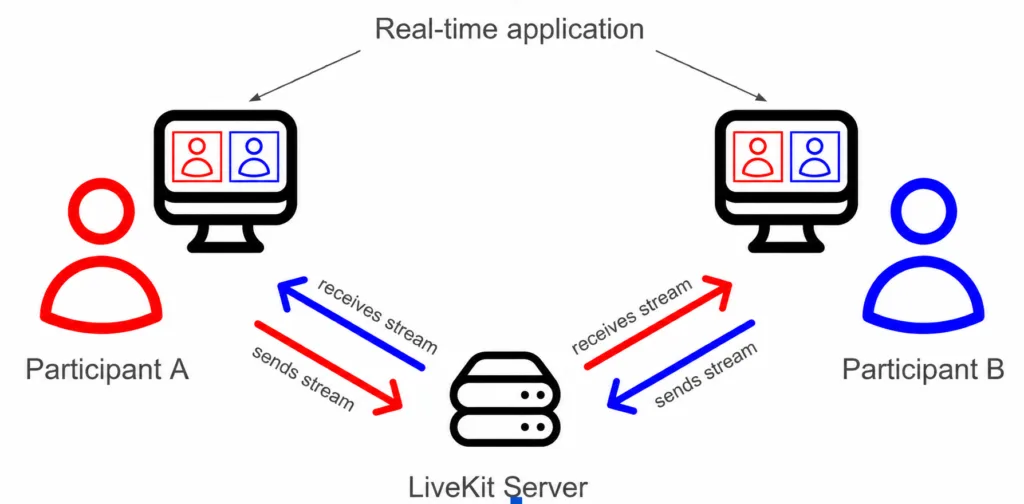
Here’s the high-level flow:
- Clients (web or mobile apps) connect to a LiveKit server using an SDK.
- A participant “publishes” their microphone and camera as tracks.
- The server’s SFU forwards those tracks to every subscriber who wants them.
An SFU (Selective Forwarding Unit) is the key architectural choice. Unlike a mesh network (where every client sends a copy of its stream to every other client expensive and non-scalable beyond 4–5 people), the SFU receives each track once from the publisher. It then forwards copies only to subscribers, choosing the right quality layer via simulcast.
Why this matters:
- Low latency: No unnecessary decoding/re-encoding on the server.
- Scalable fan-out: One publisher can reach hundreds of viewers without melting their upload bandwidth.
- Efficient bandwidth: Subscribers get only the resolution they need.
Trade-off: You still manage your own app logic, authentication, and monitoring but the media plumbing is solved.
What is Egress?
LiveKit Egress is the service that exports live media from a room to cloud storage (MP4/HLS) or live streaming platforms (RTMP) via a single API call.
Egress is LiveKit’s export service. It takes live media flowing through a room and sends it somewhere else: a file in cloud storage, an HLS playlist for on-demand playback, or a live RTMP stream to YouTube/Twitch.
Think of it as the bridge from “LiveKit room” → “Saved or broadcast media.” One API call starts the job; the rest is handled for you.
Why Egress is Important
Most real-time apps eventually need persistence or wider distribution:
- Record meetings for async review or legal compliance.
- Stream the same session to external platforms without extra client-side work.
- Feed raw or composited media into AI pipelines for transcription, analysis, or model training.
Without a clean egress story, you end up hacking together screen recordings or custom FFmpeg pipelines fragile and hard to scale.
Types of Egress
LiveKit offers several targeted options. Choose based on what you actually need:
- Room Composite Recording: Full-room view (all participants laid out in a web template rendered by headless Chrome). Ideal for lecture capture or Zoom-like meetings.
- Participant Recording: One person’s audio + video. Great for online classes where you only want the instructor.
- Track Egress: Raw, pass-through export of a single audio or video track (no transcoding). Perfect for AI post-processing or custom pipelines.
- Track Composite: Sync one audio track + one video track (more control than Participant).
- RTMP Streaming: Push live to YouTube, Twitch, etc.
- HLS Output: Segmented adaptive streaming for low-latency playback or CDN distribution.
- Auto Egress: Configure a room to start recording automatically on creation (composite + per-track).
Rule of thumb: Use Room Composite when you want the full session as viewers saw it. Use Track Egress when you need raw data for flexibility or cost (no Chrome rendering overhead).
How Egress Works (Flow)
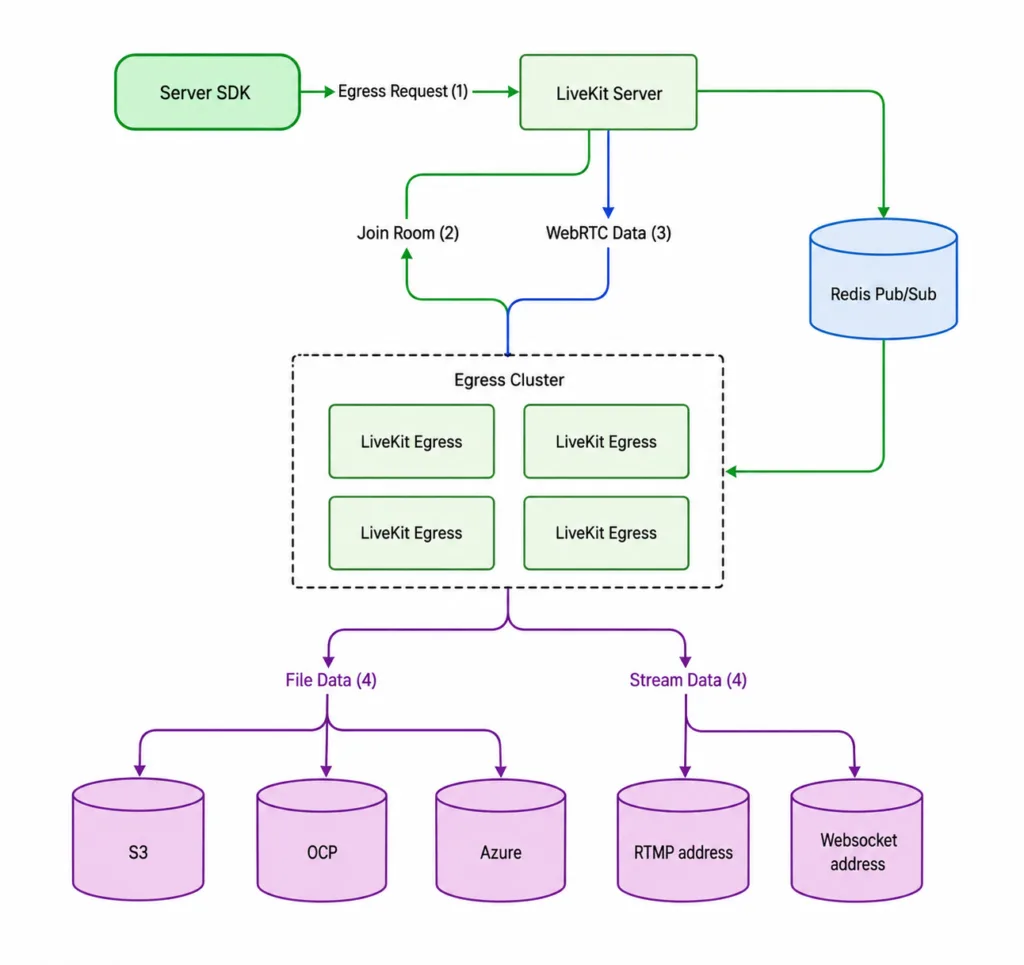
- Participants join a LiveKit room and publish tracks media flows in real time.
- Your backend calls the Egress API (via server SDK).
- An Egress worker picks up the job from a Redis queue.
- The worker connects (either via SDK for tracks or Chrome for composites), encodes/transcodes with GStreamer, and writes outputs.
- Results land in S3/GCS/Azure or stream out via RTMP/HLS.
The same job can produce multiple outputs simultaneously (e.g., MP4 file + RTMP stream) from one transcoding pass efficiently.
Architecture Overview
LiveKit’s architecture cleanly separates concerns:
- Clients (Web/Mobile SDKs) → publish/subscribe tracks.
- LiveKit Server (SFU) → core media routing and room state (control + data plane).
- Egress Service → separate, horizontally scalable workers that handle recording/streaming jobs.
- Redis → job queue and load balancing between LiveKit server and Egress workers.
- Storage (S3/GCS) → final MP4/HLS files.
End-to-End Flow
Ingress (if you bring in external streams) → LiveKit SFU (real-time distribution) → Egress (export). Multiple participants publish simultaneously; one Egress job can composite everything or cherry-pick tracks. Outputs happen in parallel without affecting the live room.
Scaling & Performance
Egress is CPU-intensive (especially Room Composite, which runs Chrome + encoding).
- Run dedicated instances or autoscaling groups (Kubernetes Helm chart supports CPU-based autoscaling).
- One worker can handle many Track Egress jobs but fewer composites (plan 2–6 CPUs per heavy job).
- Storage: Use high-throughput buckets and lifecycle policies recordings add up fast.
- Outbound bandwidth: RTMP to distant endpoints adds latency; keep egress workers near your destinations.
Real-World Use Cases
- Video conferencing: Record every meeting automatically.
- Live streaming platforms: One room feeds both in-app viewers and YouTube.
- Online education: Room Composite for full lecture capture; Participant for instructor-only archives.
- Voice AI apps: Track Egress for clean audio feeds into models, with recordings for audit trails.
- Gaming/social apps: Low-latency rooms plus HLS for highlights.
Challenges and Considerations
- Cost: Encoding is not free monitor CPU hours and storage growth.
- Observability: Use LiveKit’s built-in metrics and webhooks for job status; implement retries for transient failures.
- Partial outputs: Network blips can produce incomplete files handle gracefully.
- Rate limits: External platforms (YouTube) have their own streaming limits.
- Security: Egress workers need careful sandboxing (Chrome is enabled by default).
LiveKit vs. Traditional Approach
Without LiveKit you’d build your own WebRTC SFU (or use a hosted one), manage TURN/ICE, write custom media servers for recording, and handle scaling manually. It’s months of work and ongoing ops pain.
With LiveKit you get the SFU, SDKs, and Egress out of the box. You still own auth, UI, business logic, and monitoring but you ship faster and sleep better.
Building Scalable Real-Time Media Experiences
LiveKit simplifies the development of low-latency real-time audio and video applications by combining a powerful SFU architecture with scalable recording and streaming capabilities through Egress. From video conferencing and live streaming to AI voice agents and virtual classrooms, LiveKit enables teams to manage media distribution, recording, and broadcasting efficiently without building complex infrastructure from scratch. With dedicated Egress workers handling recordings and exports independently, applications remain stable and scalable under heavy workloads. At Bluetick Consultants, we help businesses build modern real-time communication platforms powered by WebRTC, cloud-native infrastructure, and AI-driven media solutions tailored for performance and growth.
Frequently Asked Questions
What is LiveKit Egress used for?
LiveKit Egress exports live room media to MP4 files, HLS playlists, or RTMP streams for recording, compliance, or broadcasting to YouTube and Twitch.
Does LiveKit Egress affect the live room performance?
No. Egress workers run as separate, horizontally scalable services and join the room independently, so live participants are unaffected.
Which egress type should I use for AI audio processing?
Use Track Egress – it exports raw audio without transcoding, making it the lightest and most suitable option for feeding AI pipelines.
Can one Egress job produce multiple outputs?
Yes. A single transcoding pass can produce an MP4 file and an RTMP stream simultaneously.
Do I need to self-host LiveKit Egress?
Only if you self-host LiveKit. LiveKit Cloud customers get Egress included with no additional configuration.