Published: May 7, 2026 | Last Updated: June 11, 2026
TL;DR: This post explains how we built an async script execution engine inside a B2B SaaS workflow system using AWS Lambda. In short, we solved the worker-blocking problem by invoking Lambda asynchronously, pausing the workflow via a custom error class, and resuming it through a callback. By the end, you will understand the full architecture, trade-offs, and lessons learned.
The platform in question is a B2B SaaS product with a visual workflow builder users drag and drop nodes onto a canvas, connect them, and automate business operations. A typical workflow might trigger on subscription creation, look up the associated customer, evaluate their tier, and generate an invoice. This covers the majority of automation use cases.
Why We Needed a Script Node
We needed a script node because users required a way to write custom inline JavaScript logic for edge cases that no built-in node type could handle – such as conditional discount calculations or business-specific rules.
However, the gap showed up in the remaining cases: custom logic that doesn’t map to any built-in node type. A discount calculation that depends on three fields and a date range. A conditional with business rules too specific to generalize. Users kept asking for the ability to write a small piece of code inline within a workflow. This post covers how we built that capability the architectural decisions, the trade-offs, and what we learned along the way.
The Workflow Engine: Architecture and Constraints
To understand the script component, we must first understand the workflow engine it runs inside, because the engine’s constraints shaped every decision.
Data Model
Specifically, the frontend is a React-based visual builder. Users construct flows by dragging nodes onto a canvas and wiring them together. Each workflow persists as a JSON document in MongoDB structurally a linked list of nodes, where each node carries a type, a data payload, and a pointer to the next node(s).
Nodes fall into three categories:
| Category | Node Type | Backend Connector | Purpose |
| Trigger | Event-based / Scheduled | Initiates the workflow; output becomes initial context | |
Interaction | Lookup | LookupConnector | Queries the database for records |
| Action | ActionConnector | Creates, updates, or deletes records | |
| Webhook | WebhookConnector | Fires HTTP callouts to external services | |
| Subflow | SubFlowConnector | Invokes another workflow | |
| Invoke | InvokeConnector | Triggers platform processes (billing runs, payment runs) | |
| Script | ScriptConnector | Executes user-written JavaScript (this post) | |
Logic | Decision | DecisionConnector | Conditional branching based on evaluated conditions |
| Assignment | AssignmentConnector | Sets or modifies workflow variables | |
| Loop | LoopConnector | Iterates over collections | |
| Delay | DelayConnector | Pauses execution for a configured duration |
How the Workflow Engine Processes Nodes
Execution RabbitMQ drives execution. When a workflow triggers, a message is published to the flow. process queue. A Sneakers worker picks it up, loads the corresponding workflow log from MongoDB, and walks the node chain:
def perform(parsed_data)

  log = WorkflowLog.find(parsed_data['log_id'])

  dto = Workflows::DTO::WorkflowDTO.new(workflow_log: log, ancestor_context: ...)

  dto.set_path(dig_lookup(log.head))

  Workflows::WorkflowEventMediator.call(run: parsed_data['run'], dto: dto)

end
First, the mediator resolves the current node’s type, looks up the correct connector, and calls process(dto:). Then, the connector performs its operation, writes its output into head_context on the workflow log, advances head to the next node, and the mediator loops. When no nodes remain, the workflow completes.
This execution is fully synchronous within a single worker. The worker picks up a message, processes every node in sequence, and acks the RabbitMQ message only when execution finishes or fails. There is no yielding, no async callback mechanism, no “process this node and resume later.” It runs start to finish in one pass.
Accordingly, the error handling in the worker reflects this model:
rescue StandardError => e

  # log error, notify Honeybadger, message gets requeued

rescue Workflows::Error::Paused, Workflows::Error::Terminated => e

  logger.info "#{e.message}"

end
In this case, standard errors trigger a requeue (retry). Paused and Terminated are caught silently — the message is acked and the worker moves on. The Paused error class was introduced specifically for the script component, covered below.
Overall, this architecture works well for nodes that execute in milliseconds – database lookups, record updates, variable assignments. The challenge arises when introducing a node whose execution time is unbounded and controlled by user-written code.
Initial Approach: Sidecar V8 Service
The first technical spec proposed a sidecar Node.js service running isolated-vm – a library that provides isolated V8 instances with configurable memory limits and execution timeouts.
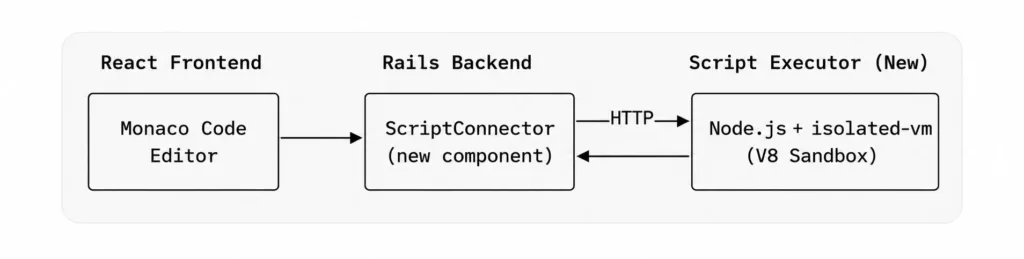
In theory, this approach offered clean separation of concerns: Rails handles workflow orchestration, the Node.js service handles sandboxed execution. Initially, the estimate was six weeks with two engineers. However, a fundamental issue emerged during design review.
In essence, the sidecar model is synchronous from the worker’s perspective. The connector would make an HTTP call to the sidecar, block while the script executes, and return the result. If a user’s script runs for 8 seconds, the worker is blocked for 8 seconds holding a RabbitMQ connection, unable to process other workflows. With a finite worker pool that was already under pressure during month-end billing runs, adding unbounded synchronous execution was not viable.
Consequently, the sidecar approach only works if script execution is fast and predictable. Unfortunately, user-written code is neither. We needed asynchronous execution and once async is a requirement, the sidecar model introduces more complexity than it resolves.
| Criteria | Sidecar (isolated-vm) | AWS Lambda |
| Execution model | Synchronous — blocks the worker | Asynchronous — worker released immediately |
| Isolation | V8 isolate per execution | Separate container per invocation |
| Scaling | Manual (min 2 instances for HA) | Automatic |
| Infrastructure | New Node.js service to deploy/monitor | Managed by AWS |
| Cold start | None (service always running) | 1-3s after inactivity |
| Estimated effort | ~6 weeks, 2 engineers | ~3 weeks, 1 engineer |
| Maintenance | Service updates, health checks, CI/CD | Lambda runtime updates only |
Revised Approach: AWS Lambda with Async Callback
As a result, AWS Lambda addressed every infrastructure concern from the original design:
- Tenant isolation: For instance, each invocation runs in its own container
- Resource limits: memory and timeout are configurable per function
- Scaling: handled automatically by AWS
- Async invocation: the caller fires the Lambda and gets control back immediately
However, the trade-off is that Lambda’s async invocation mode does not return a result to the caller. Therefore, the result has to come back through a separate channel. As a consequence, this led to a callback-based architecture:
- Workflow reaches a script node
- The connector uploads the workflow context (trigger data, lookup results, variables) to S3
- The connector invokes the Lambda asynchronously, passing only the S3 key
- The connector marks the workflow as paused, acks the RabbitMQ message, and releases the worker
- The Lambda downloads its context from S3 and executes the user’s script
- The Lambda POSTs the result to a callback endpoint on the API
- The callback handler writes the result into the workflow log, sets status to in_progress, and re-publishes to RabbitMQ
- A worker picks it up; the ScriptConnector detects the result already exists and advances to the next node
Importantly, the workflow engine had no concept of “pausing” before this. Introducing it required a controlled way to halt mid-execution without triggering retries or failure states.
Implementation Details
Script Validation
To prevent abuse, user scripts we validate at both save time and execution time before any Lambda invocation. The ScriptConnector enforces a size limit and scans for forbidden code patterns:
SCRIPT_MAX_SIZE = 50_000 # 50 KB

FORBIDDEN_PATTERNS = [

  /require\s*\(/i,      # No require

  /import\s+.*from/i,   # No ES6 imports

  /process\./i,         # No process access

  /eval\s*\(/i,         # No eval

  /Function\s*\(/i,     # No Function constructor

  /__proto__/i          # No prototype manipulation

].freeze

def validate_script!(script_code)

  if script_code.blank?

    raise StandardError, I18n.t('workflow_error.script.code_required', api_name: @variable_name)

  end

  if script_code.bytesize > SCRIPT_MAX_SIZE

    raise StandardError, I18n.t('workflow_error.script.too_large',

                                 api_name: @variable_name, max_size: SCRIPT_MAX_SIZE / 1000)

  end

  FORBIDDEN_PATTERNS.each do |pattern|

    if pattern.match?(script_code)

      raise StandardError, I18n.t('workflow_error.script.forbidden_pattern',

                                   api_name: @variable_name, pattern: pattern.source)

    end

  end

end| Threat | Mitigation |
| Arbitrary require/import | Blocked by regex at validation time |
| process.exit() / process.env access | Blocked by regex; Lambda also runs in isolated container |
| eval() / Function() constructor | Blocked to prevent dynamic code generation |
| Prototype pollution via __proto__ | Blocked by regex |
| Infinite loops / memory exhaustion | Lambda-level timeout (30s) and memory limit (256MB) |
| Cross-tenant data access | Each invocation receives only its own S3 context |
Pause and Resume Mechanism
At its core, the pause mechanism uses a dedicated error class, Workflows::Error::Paused. When the ScriptConnector fires the Lambda, the last step is raising this error. The FlowWorker’s rescue block catches it alongside Terminated the message is acked, the worker proceeds to the next message in the queue.
def process(dto:)

  return if script_already_executed?(dto)

  workflow_context = build_workflow_context(dto)

  s3_key = upload_context_to_s3(dto, workflow_context)

  dto.add_to_context(record: {

    _pending: true,

    _s3_key: s3_key,

    _invoked_at: Time.now.iso8601

  })

  lambda_client.invoke({

    function_name: function_name,

    invocation_type: 'Event',

    payload: { s3_key: s3_key, workflow_log_id: ..., script_api_name: ... }.to_json

  })

  dto.workflow_log_update(status: 'paused')

  raise Workflows::Error::Paused, "Waiting for script callback"

end |
Admittedly, using an exception for flow control is an acknowledged trade-off. The alternative refactoring the engine into an explicit state machine with yield semantics would have been a significantly larger effort. Since the worker already distinguished between retriable errors (StandardError) and terminal states (Terminated), adding Paused to the terminal rescue clause was a minimal change. This approach has been stable in production.
On the other hand, the callback interactor handles the incoming POST from Lambda on the resume side:
def resume_workflow

  Workflows::Connector::ScriptConnector.resume_with_result(

    workflow_log: @workflow_log,

    script_api_name: script_api_name,

    result: result_data,

    logs: logs_data,

    execution_time_ms: execution_time_ms

  )

  context.response = { success: true, message: 'Workflow resumed' }

end
|
Inside resume_with_result, the script’s return value is written into head_context (the MongoDB document field where each node stores its output), the status is set back to in_progress, and the message is re-published to RabbitMQ:
def self.resume_with_result(workflow_log:, script_api_name:, result:, ...)

  updated_context = workflow_log.head_context.deep_dup

  updated_context[script_api_name] = {

    data: result,

    mode: 'script',

    ...

  }

  workflow_log.update(head_context: updated_context, status: 'in_progress')

  Workers::Publisher.publish('flow', { log_id: workflow_log.id }, ...)

end |
Subsequently, when the FlowWorker picks this message up, process() is called again on the ScriptConnector. This time, script_already_executed? detects real data in head_context (rather than _pending: true), returns early, and the workflow continues to the next node as if the script ran synchronously.
Lambda Lifecycle Management
Notably, each script node in a workflow maps to its own Lambda function. A LambdaManager service handles the full lifecycle creation, updates, and cleanup.
Lambda configuration:
| Parameter | Value | Notes |
| Runtime | nodejs18.x | AWS SDK v3 included in runtime |
| Timeout | 30 seconds | Covers most user scripts with margin |
| Memory | 256 MB | Sufficient for data transformation workloads |
| Handler | index.handler | Single-file deployment via ZIP |
| Invocation type | Event (async) | Fire-and-forget; result comes via callback |
| Naming convention | workflow-{workflow_id}-{script_api_name} | Ensures uniqueness per workflow + node |
Lambda creation happens at workflow save time. The LambdaManager finds all script nodes in the workflow’s flow document, generates a handler for each, and pushes to AWS:
def create_lambda(workflow_id:, script_api_name:, script_code:, company:, user:)function_name = build_function_name(workflow_id, script_api_name)
handler_code = build_handler_code(script_code, company, user)
zip_data = create_lambda_zip(handler_code)
response = @lambda_client.create_function({
function_name: function_name,
runtime: LAMBDA_RUNTIME,
role: @role_arn,
handler: ‘index.handler’,
code: { zip_file: zip_data },
timeout: LAMBDA_TIMEOUT,
memory_size: LAMBDA_MEMORY,
environment: {
variables: {
‘S3_BUCKET’ => @s3_bucket,
‘CALLBACK_BASE_URL’ => @callback_base_url
}
},
description: “Workflow script: #{script_api_name} (workflow: #{workflow_id})”
})
wait_for_lambda_active(function_name)
response.function_arn
rescue Aws::Lambda::Errors::ResourceConflictException => e
# Lambda already exists — update code instead
update_lambda_code(function_name, script_code, company, user)
get_lambda_arn(function_name)
end
Generated Lambda Handler
The generated handler wraps the user’s code in a complete Lambda function that handles S3 download, console.log capture, and the callback POST:
const { S3Client, GetObjectCommand } = require('@aws-sdk/client-s3');

const https = require('https');

const http = require('http');

const s3Client = new S3Client({});

const S3_BUCKET = process.env.S3_BUCKET;

const CALLBACK_BASE_URL = process.env.CALLBACK_BASE_URL;

// Auth headers embedded at Lambda creation time

const AUTH_HEADERS = {

  'X-User-Email': '<embedded>',

  'X-User-Token': '<embedded>',

  'X-User-Company': '<embedded>',

  'Content-Type': 'application/json'

};

exports.handler = async (event) => {

  const { s3_key, workflow_log_id, script_api_name } = event;

  const startTime = Date.now();

  let workflow = {};

  const logs = [];

  // Capture console.log output from user script

  const originalLog = console.log;

  const captureLog = (...args) => {

    const message = args.map(a => typeof a === 'object' ? JSON.stringify(a) : String(a)).join(' ');

    logs.push(message);

    originalLog.apply(console, args);

  };

  try {

    // 1. Download context from S3

    const command = new GetObjectCommand({ Bucket: S3_BUCKET, Key: s3_key });

    const s3Response = await s3Client.send(command);

    const bodyContents = await streamToString(s3Response.Body);

    workflow = JSON.parse(bodyContents);

    // 2. Execute user script with captured console.log

    console.log = captureLog;

    const userResult = await (async () => {

      // ---- USER'S SCRIPT CODE IS EMBEDDED HERE ----

    })();

    console.log = originalLog;

    const executionTime = Date.now() - startTime;

    // 3. Callback with result

    await callbackToRails({

      success: true,

      workflow_log_id,

      script_api_name,

      s3_key,

      result: userResult,

      logs,

      execution_time_ms: executionTime

    });

  } catch (error) {

    console.log = originalLog;

    // 4. Callback with error

    await callbackToRails({

      success: false,

      workflow_log_id,

      script_api_name,

      s3_key,

      error: error.message,

      logs,

      execution_time_ms: Date.now() - startTime

    });

  }

}; |
It is worth noting that a design decision here: auth headers we embed auth headers directly in the Lambda code rather than fetched from AWS Secrets Manager at runtime. The Secrets Manager approach is architecturally cleaner but adds ~200ms to cold starts. Since these are service-level credentials (not user-specific) that rotate infrequently, the embedded approach was a reasonable trade-off.~200 ms
Lifecycle hooks tie into the existing workflow interactors:
| Workflow Event | LambdaManager Method | Behavior |
| Create workflow | create_or_update_lambdas_for_workflow | Creates a Lambda for each script node |
| Update workflow | create_or_update_lambdas_for_workflow | Updates code if Lambda exists; creates if new |
| Delete workflow | delete_lambdas_for_workflow | Deletes all Lambdas for the workflow |
| Remove a script node | cleanup_removed_script_lambdas | Deletes Lambda for the removed node |
Finally, the Lambda ARN is stored back into the script node’s data field within the workflow’s flow document in MongoDB, making the workflow self-describing any workflow can be inspected to see which Lambda function it references.
S3 as a Context Transport Layer
Lambda’s async invocation payload limit is 256KB. A workflow’s execution context trigger data, lookup results, variables from assignment nodes can easily exceed that in production use cases. A dedicated ScriptContextService handles S3 operations:
class ScriptContextService

  S3_FOLDER = 'workflow-scripts'.freeze

  def upload_context(workflow_log_id:, script_api_name:, company_id:, context:)

    s3_key = build_s3_key(workflow_log_id, script_api_name, company_id)

    @s3_client.put_object(

      bucket: @bucket_name,

      key: s3_key,

      body: context.to_json,

      content_type: 'application/json'

    )

    s3_key

  end

  def delete_context(s3_key)

    @s3_client.delete_object(bucket: @bucket_name, key: s3_key)

  rescue Aws::S3::Errors::NoSuchKey

    true # Already deleted

  end

  private

  def build_s3_key(workflow_log_id, script_api_name, company_id)

    timestamp = Time.now.to_i

    "#{S3_FOLDER}/#{@env}/#{company_id}/#{workflow_log_id}-#{script_api_name}-#{timestamp}.json"

  end

end |
In addition, the S3 key format encodes debugging-relevant metadata:
workflow-scripts/{env}/{company_id}/{log_id}-{api_name}-{timestamp}.json
The data flow through S3 at each stage:
| Stage | S3 Operation | Data | Owner |
|---|---|---|---|
| Before Lambda invocation | PUT | Workflow context (trigger, lookups, variables) | ScriptConnector |
| During Lambda execution | GET | Same context, downloaded by Lambda | Lambda handler |
| After callback received | DELETE | Cleanup | ScriptCallback interactor |
Moreover, if a callback never arrives and the S3 file persists, it serves as a signal that a workflow is stuck the file’s timestamp and key metadata identify exactly which execution is affected.
User-Facing Interface
Importantly, from the user’s perspective, the implementation details are fully abstracted. They write JavaScript in a code editor within the workflow builder and have access to a workflow object populated from the execution context:
| Property | Source | Description |
| workflow.trigger | Trigger / auto-launched node | The record that initiated the workflow |
| workflow.variables | Assignment nodes | Merged key-value pairs from all upstream assignment nodes |
| workflow.lookups | Lookup nodes | Results keyed by each lookup node’s api_name |
| workflow.lookups.<api_name> | Specific lookup node | Access a specific lookup’s data directly |
| workflow.company | Platform context | { id, name } of the current company |
| workflow.currentNode | Script node metadata | { api_name, name } of the current script node |
On save, a Lambda function is created or updated with this code embedded. Subsequently, at execution time, the full pause → Lambda → callback → resume cycle runs transparently. At execution time, the full pause → Lambda → callback → resume cycle runs transparently. The returned object becomes available to downstream nodes via head_context, and console.log output is captured and surfaced in the workflow execution log.
Callback API
The callback endpoint receives the Lambda’s POST and delegates to a ScriptCallback interactor:
# POST /api/v1/workflows/script_callback
def script_callback

  result = Workflows::ScriptCallback.call(

    current_company: current_company,

    params: callback_params

  )

  if result.success?

    render json: result.response

  else

    render json: result.errors, status: 422

  end

end

def callback_params

  params.permit(

    :success, :workflow_log_id, :script_api_name, :s3_key,

    :error, :execution_time_ms,

    result: {}, logs: []

  ).to_h.with_indifferent_access

end |
The interactor validates the params, finds the workflow log (scoped to the authenticated company for security), deletes the S3 context file, and either resumes or fails the workflow:
def call

  validate_params!

  find_workflow_log!

  delete_s3_context_file

  process_callback

end

def process_callback

  if success?

    resume_workflow

  else

    fail_workflow

  end

end |
Callback payload structure (sent by Lambda):
| Field | Type | Description |
| success | Boolean | Whether the script executed without errors |
| workflow_log_id | String | Identifies which workflow to resume |
| script_api_name | String | Identifies which script node produced the result |
| s3_key | String | S3 key for context file cleanup |
| result | Object | Script’s return value (on success) |
| error | String | Error message (on failure) |
| logs | Array | Captured console.log output |
| execution_time_ms | Integer | Script execution duration |
On failure, the workflow log the system marks the workflow log as failed with the error and captured logs stored for debugging:
def self.fail_with_error(workflow_log:, script_api_name:, error:, logs:)

  workflow_log.update(

    status: WorkflowLog::STATUS[3], # failed

    failure: "#{script_api_name}: Script execution failed - #{error}",

    back_trace: logs.join("\n")

  )

end |
Lessons from Development
In particular, one issue during development deserves mention because it illustrates a non-obvious consequence of the architecture: the callback URL is embedded in the Lambda handler at save time. During local development, the Lambda runs in AWS but needs to POST back to the local Rails server via ngrok:
config.hosts << /.*\.ngrok-free\.app/

config.hosts << /.*\.ngrok\.io/
Specifically, when the ngrok URL changes (which it does on every restart with a free plan), the Lambda still has the previous URL baked in. The callback silently fails, and the workflow remains paused indefinitely. The symptom workflow stuck in paused looks identical to a bug in the pause/resume logic, which made it time-consuming to diagnose initially. Therefore, the fix is to re-save the workflow (which regenerates the Lambda with the current URL). We also added explicit logging of the callback URL and response status in the Lambda handler to make this class of issue immediately visible in CloudWatch.
Known Limitations and Future Work
Cold starts. The first Lambda invocation after a period of inactivity incurs 1-3 seconds of additional latency. For scheduled workflows this is negligible. For user-triggered workflows where responsiveness matters, it can be noticeable. Provisioned concurrency would address this but usage volume does not yet justify it.
Error message quality. When a user’s script throws an exception, the error surfaced in the workflow log is the raw JavaScript stack trace from the Lambda runtime e.g., TypeError: Cannot read properties of undefined (reading ‘tier’) at anonymous (eval:3:42). The line numbers reference the generated handler, not the user’s code. A source-map-style offset calculation to translate line numbers back to the user’s script is planned but not yet implemented.
S3 cleanup. For now, context file deletion is best-effort. If the callback fails and the S3 file is never deleted, it persists. The S3 key is logged alongside the workflow log for manual cleanup. An automated reaper for orphaned files (identifiable by age and corresponding workflow status) is planned. File sizes are small (2-15KB), so storage cost is not currently a concern.
Callback retry. Furthermore, if the API server is unavailable when the Lambda attempts the callback POST, the workflow stays paused. Lambda’s built-in retry for async invocations (two additional attempts) provides some resilience, but if all three fail, the workflow is stuck. A future improvement is a periodic job that identifies workflow logs stuck in paused beyond a threshold and re-invokes the corresponding Lambda.
Results
In total, the implementation took approximately three weeks with one engineer, roughly half the original estimate for the sidecar approach. The pause/resume mechanism, the only part that required changes to the core workflow engine, was approximately 50 lines of code.
Ultimately, the key architectural takeaway is this: work with the existing runtime model rather than against it. The workflow engine is synchronous; a Sneakers worker picks up a message, walks the node chain, and finishes. Rather than converting it to an async model (which would have been a large-scale refactor), the script component works within the synchronous model by pausing cleanly via the existing error handling mechanism, exiting the worker, and resuming later by re-publishing to the same queue. The workflow engine is unaware that a Lambda was executed. It simply observes that a node had no result on the first pass and had a result on the second.
Need to add custom logic like this into your workflow systems? Bluetick Consultants helps teams build scalable automation engines, async processing layers, and AI-powered digital products.
Frequently Asked Questions
What is an async script execution engine in a workflow system?
An async script execution engine allows users to write and run custom JavaScript logic inside a workflow without blocking the workflow worker. Instead of executing synchronously, the script runs in an isolated environment and sends its result back via a callback, allowing the workflow to resume from where it paused.
Why was AWS Lambda chosen over a sidecar V8 service?
The sidecar approach required the workflow worker to block while the script executed, which was not viable with a finite worker pool under load. AWS Lambda offered async invocation, automatic scaling, per-invocation isolation, and required no additional infrastructure to manage – making it the more practical choice.
How does the workflow pause and resume during script execution?
When a script node is reached, the connector uploads the workflow context to S3, invokes the Lambda asynchronously, and raises a Paused error to release the worker. Once the Lambda finishes, it POSTs the result to a callback endpoint, which writes the result into the workflow log and re-publishes the message to RabbitMQ so execution can continue.
What security measures are in place for user-written scripts?
User scripts are validated at both save time and execution time. Forbidden patterns such as require, import, eval, process access, and prototype manipulation are blocked by regex. Lambda-level timeout of 30 seconds and a 256MB memory limit prevent infinite loops and resource exhaustion. Each invocation only accesses its own S3 context, preventing cross-tenant data leakage.
What are the known limitations of this approach?
The main limitations include Lambda cold starts of 1 to 3 seconds after inactivity, raw JavaScript stack traces that reference the generated handler rather than the user’s code, best-effort S3 cleanup if a callback never arrives, and no automatic retry if the callback POST fails and all three Lambda retry attempts are exhausted.
How is the Lambda function lifecycle managed?
Each script node maps to its own Lambda function. A LambdaManager service handles creation, updates, and deletion. Lambda functions are created or updated when the workflow is saved, and deleted when the workflow or script node is removed. The Lambda ARN is stored in the workflow’s MongoDB document, making the workflow self-describing.