When React applications start growing, data quickly becomes the real challenge. Every project begins simply with a few components, some API calls, and a couple of useEffect hooks and everything works smoothly at first. But as the application scales, new features begin sharing data, multiple components start fetching the same APIs, and loading and error handling get duplicated. Over time, inconsistencies appear, where some screens show updated data while others don’t. At this stage, frontend development shifts from building UI to managing server data effectively. The root cause is straightforward: React handles UI state well, but server state introduces an entirely different set of challenges—this is where TanStack Query becomes essential.
Where TanStack Query Fits in the Architecture
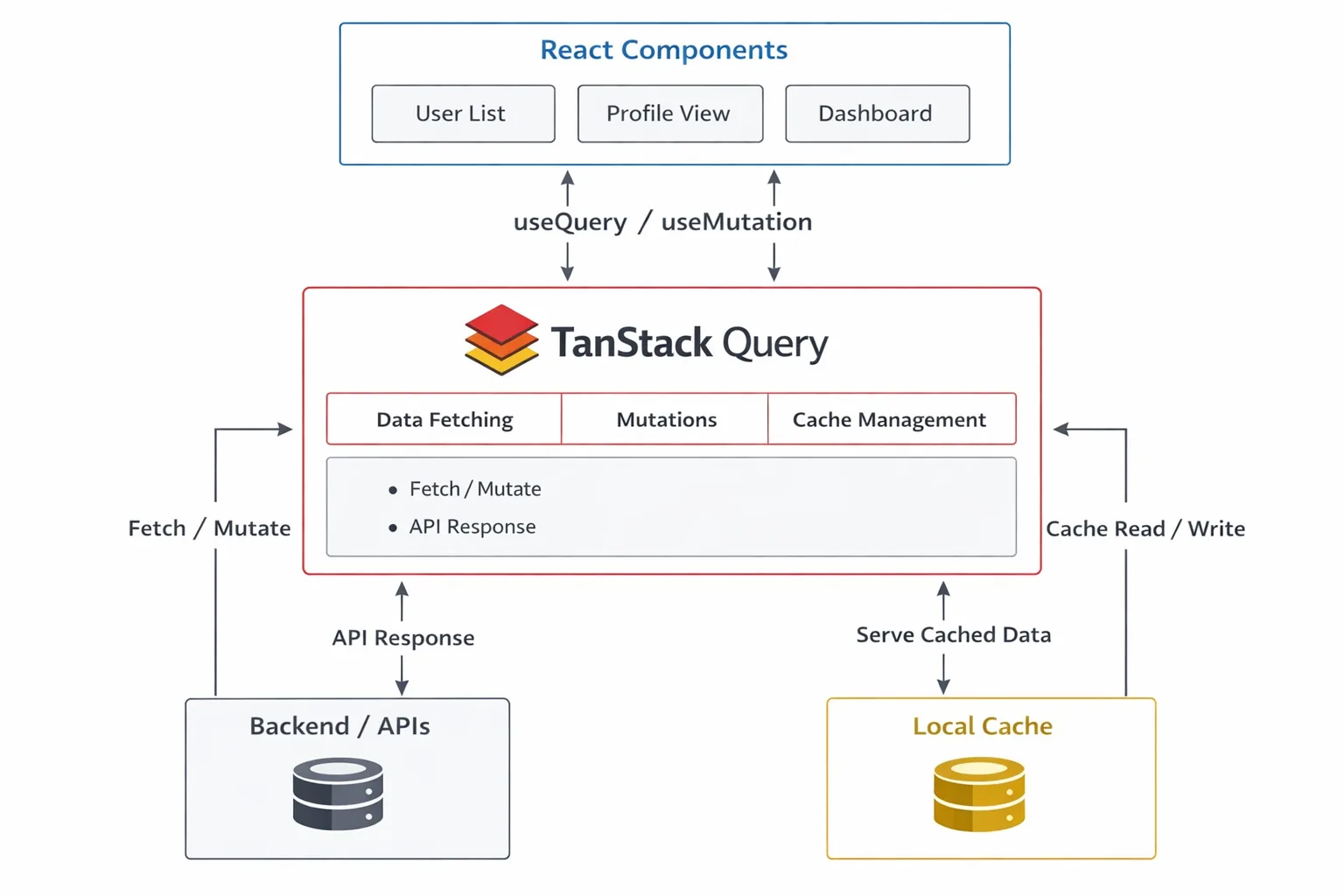
In scalable React applications, managing server data becomes increasingly complex. TanStack Query introduces a structured data layer between the UI and backend, ensuring consistent, cached, and synchronized data flow while reducing duplication, improving performance, and simplifying data management across components.
Flow overview:
- Components Request Data: React components use hooks like useQuery to request server data declaratively. This simplifies data access by removing manual lifecycle handling and ensures components stay focused on rendering logic.
- Query Handles Fetching & Caching: TanStack Query manages API calls and caching efficiently. It stores responses and reuses them, reducing duplicate requests and improving performance across different parts of the application.
- APIs Return Responses: Backend APIs process incoming requests and return structured responses. TanStack Query integrates seamlessly, handling asynchronous operations while abstracting complexities like retries, failures, and loading states from components.
- Shared Cached Data: Cached data is automatically shared across components using the same query key. This ensures consistency, eliminates redundant API calls, and keeps all parts of the application synchronized with the latest data.
This creates a single, predictable source of truth for server data.
The Problem with Traditional Fetching
A common pattern looks like this:
useEffect(() => {

 fetch("/api/users")

   .then(res => res.json())

   .then(setUsers);

}, []);
It works initially, but at scale it leads to:
- Duplicated API calls: Multiple components independently fetch the same data, increasing network load and reducing overall performance significantly.
- Repeated loading/error logic: Each component implements its own loading and error handling, leading to duplicated code and inconsistencies.
- Manual refetch handling: Developers must manually trigger data updates, increasing complexity and making synchronization across components difficult over time.
- Inconsistent data : Different components may display outdated or mismatched data, creating unreliable user experiences across the application.
Server data behaves differently from local state and needs dedicated management.
What TanStack Query Provides
TanStack Query is designed specifically for managing server state in modern applications. It simplifies data handling by automating fetching, caching, synchronization, and updates, allowing developers to focus on building features instead.
- Data Fetching: Handles API requests efficiently with built-in lifecycle management, reducing manual effort and ensuring consistent data retrieval across components.
- Caching: Stores server responses and reuses them across components, minimizing redundant API calls and improving performance significantly.
- Background Refetching: Automatically updates data in the background, keeping information fresh without interrupting user experience or requiring manual refresh logic.
- Request Deduplication: Prevents multiple identical API requests by sharing a single query, reducing network load and improving efficiency.
- Mutation Synchronization: Keeps UI and server data aligned after updates, ensuring changes reflect instantly across components without complex manual state handling.
Quick Setup
```

npm install @tanstack/react-query

```

```

import { QueryClient, QueryClientProvider } from "@tanstack/react-query";

const queryClient = new QueryClient();

<QueryClientProvider client={queryClient}>

 <App />

</QueryClientProvider>

```
Declarative Data Fetching
```

const { data, isLoading, error } = useQuery({

 queryKey: ["users"],

 queryFn: fetchUsers,

});

```
No manual loading state management or lifecycle handling required.
Why It Scales Well
Smart Caching
Shared query keys prevent duplicate API calls and enable instant rendering from cache.
Automatic Refetching
Data updates automatically when users refocus the app or reconnect to the network.
Simple Mutations
```

useMutation({

 mutationFn: addUser,

 onSuccess: () => queryClient.invalidateQueries(["users"]),

});
Cleaner Components
Components focus only on rendering instead of async orchestration.
Better Performance
Request deduplication and cache reuse significantly reduce network load.
When Not to Use It
TanStack Query is not meant for managing local UI state, forms, animations, or temporary component data. These concerns are better handled using React’s built-in state or specialized tools, as TanStack Query is designed specifically for server-state management.
Frequently Asked Questions
What is TanStack Query and why is it used in React?
TanStack Query is a data-fetching and server-state management library for React. It simplifies handling API data by managing caching, background updates, and synchronization, reducing the need for manual state and lifecycle management.
How is TanStack Query different from useEffect for data fetching?
useEffect requires manual handling of fetching, loading states, errors, and updates. TanStack Query automates these processes, provides caching, avoids duplicate requests, and ensures consistent data across components.
When should you use TanStack Query in a React application?
You should use TanStack Query when your application involves frequent API calls, shared data across components, or needs real-time updates. It is especially useful in large-scale or data-heavy applications.
Does TanStack Query replace state management libraries like Redux?
No, TanStack Query is designed for server-state management, while tools like Redux handle global client-side state. They can be used together, depending on application needs.
From Ad-hoc Fetching to Predictable Data Architecture in React
Scaling React applications isn’t just about adding features it’s about managing data reliably as complexity increases.
TanStack Query introduces a structured approach to server-state management through caching, synchronization, and background updates. By removing repetitive async logic, it helps teams build faster, cleaner, and more maintainable React applications.
If your application is growing and data handling is becoming harder to manage, TanStack Query is often the upgrade that brings structure back to your architecture.
Struggling to manage data complexity in your React applications?
Connect with Bluetick Consultants to design scalable frontend architectures and implement structured server-state management using TanStack Query.