Generative AI adoption in enterprises has largely followed a familiar pattern so far: chat interfaces, prompt engineering, and ad-hoc copilots layered on top of existing tools. While useful, this approach often breaks down when teams try to operationalize AI across departments.
Anthropic’s Knowledge Work Plugins, recently open-sourced, signal a meaningful shift in this trajectory.
Instead of treating AI as a generic assistant, these plugins model real organizational roles such as product managers, analysts, legal reviewers, or operations specialists and encode their workflows, decision logic, and constraints directly into reusable AI components.
At Bluetick Consultants, where we work closely with enterprises on AI-native digital products and delivery models, this release stands out as a practical blueprint for building role-aware, production-ready AI systems.
From “Prompting” to Role-Based AI Systems
Most enterprise AI adoption still depends on shared chatbots and individual prompting skills, which leads to inconsistent results and limited repeatability across teams. While useful for experimentation, this model struggles to scale in structured business environments. Anthropic’s Knowledge Work Plugins address this by embedding role-specific skills, workflows, and tools. The result is AI that works like a role-aware assistant aligned with how teams actually operate.
What Are Knowledge Work Plugins?
Knowledge Work Plugins define how work is executed, not just what AI should answer. They package role logic, operating patterns, and tool access into simple files, enabling Claude to function as a dependable team member embedded inside real enterprise workflows.
Function | What the AI role is designed to handle | Typical Systems Connected |
Productivity | Coordinates daily work by tracking tasks, schedules, priorities, and personal context across tools. | Slack, Notion, Jira, Asana, Microsoft 365, ClickUp |
Sales | Supports pipeline execution through account research, call preparation, outreach drafting, and competitive analysis. | HubSpot, ZoomInfo, Slack, Notion, Fireflies, Jira |
Customer Support | Manages ticket triage, response drafting, escalation summaries, and post-resolution documentation. | Intercom, HubSpot, Slack, Guru, Notion |
Product Management | Assists with PRDs, roadmap planning, research synthesis, stakeholder updates, and market tracking. | Jira, Linear, Figma, Amplitude, Notion, Slack |
Marketing | Produces campaign assets, enforces brand consistency, analyzes competitors, and consolidates performance insights. | HubSpot, Canva, Figma, Ahrefs, Klaviyo |
Legal | Reviews agreements, evaluates compliance risk, handles NDA workflows, and prepares structured legal outputs. | Box, Egnyte, Microsoft 365, Jira |
Finance | Supports accounting operations including reconciliations, variance analysis, financial reporting, and audits. | Snowflake, BigQuery, Databricks, Slack |
Data | Enables analytics work such as SQL generation, data validation, statistical analysis, and dashboard creation. | BigQuery, Snowflake, Hex, Jira |
Enterprise Search | Provides unified access to internal knowledge across chats, documents, and collaboration platforms. | Slack, Notion, Guru, Asana |
Bio Research | Accelerates early-stage life sciences research through literature review and target analysis workflows. | PubMed, bioRxiv, ClinicalTrials.gov, Benchling |
Inside a Plugin: How It Actually Works
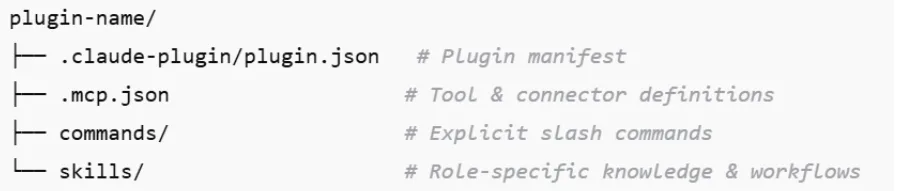
Every Knowledge Work Plugin follows the same structure:
1. Skills: The Brain of the Role
Skills form the core intelligence of each role. Defined as simple markdown files, they capture how work is actually performed, including standard workflows, step-by-step reasoning patterns, decision-making frameworks, and the domain-specific terminology that teams use every day.
For example:
- A finance skill knows how month-end close works
- A product management skill understands PRDs, roadmaps, and stakeholder updates
- A sales skill knows how to prep call notes and build battlecards
2. Commands: Explicit, Repeatable Actions
Commands define clear, repeatable actions that users can trigger explicitly using slash syntax. They standardize common workflows, ensuring consistent execution and predictable outputs across teams, regardless of individual prompting skill or experience.
- /sales:call-prep
- /data:write-query
- /finance:reconciliation
- /product-management:write-spec
3. Connectors: Where Real Work Happens
Connectors link Claude directly to enterprise systems using the Model Context Protocol. Based on the role, they integrate collaboration, CRM, data, design, analytics, and productivity tools, allowing AI to operate within real business environments.
Getting Started: Using Knowledge Work Plugins
Teams can begin using Knowledge Work Plugins in two straightforward ways, depending on how hands-on they want to be.
Option 1: Claude Cowork
Plugins can be installed directly from claude.com/plugins. Once enabled, they activate automatically based on context, with no manual configuration required.
Option 2: Claude Code (Developer-Friendly)
Developers can install plugins via the CLI by first adding the marketplace and then installing specific role plugins. After installation, skills trigger automatically, slash commands become available, and no additional setup is needed making this one of the cleanest onboarding experiences for enterprise AI tooling.
Practical Examples: Knowledge Work
Plugins in Action
To understand the operational impact of role-based plugins, consider how they can change common enterprise workflows.
Product Management
Before:
A product manager manually reviews Slack threads, Jira tickets, and customer feedback to draft a PRD, often spending 3–4 hours synthesizing inputs.
After:
/product-management:write-spec pulls relevant Jira issues, summarizes Slack discussions, extracts insights from Notion, and generates a structured PRD in about 25 minutes with consistent formatting.
Finance Month-End Close
Before:
Finance teams manually reconcile revenue data from Snowflake, analyze discrepancies in spreadsheets, and draft explanations for variances.
After:
/finance:reconciliation queries the data warehouse, flags anomalies above defined thresholds, drafts a structured variance report, and posts it for review reducing cycle time by roughly 40%.
Customer Support Escalation
Before:
Escalations require manual review of ticket history, Slack discussions, and internal documentation to understand the issue context.
After:
/customer-support:escalate compiles the entire ticket thread, summarizes sentiment, highlights potential risk signals, and drafts a recommended resolution path in under 30 seconds.
Sales Pipeline
Before:
Sales leaders manually gather updates from CRM dashboards, Slack conversations, and call notes to prepare pipeline review meetings.
After:
/sales:pipeline-review aggregates CRM data, summarizes deal risks, highlights stalled opportunities, and generates a concise pipeline briefing with recommended actions for leadership review.
Why This Could Disrupt the Indian IT Services Model
Traditional IT services firms largely operate on custom development, time-and-material billing, and large delivery teams that implement business workflows in software. Much of this work involves translating role-based processes such as finance operations, support workflows, or sales reporting into applications, dashboards, and integrations that often take months to design and deploy.
Knowledge Work Plugins challenge this model by embedding many of these workflows directly into AI roles. Tasks that previously required dedicated development, such as preparing reports, drafting documentation, analyzing data, or coordinating internal processes, can now be handled by role-aware AI systems that already understand the operating patterns of those functions.
This shift reduces the need to repeatedly build similar workflow software across clients. Instead of writing custom code for every implementation, organizations can start with pre-modeled roles and encoded best practices, then customize them for internal context, tools, and governance.
For IT services providers, this changes where value is created. The emphasis moves away from large-scale custom development and toward AI workflow design, knowledge modeling, and enterprise integration. Firms that adapt to this shift can help organizations operationalize AI across roles, while those relying purely on traditional delivery models may find parts of their service stack becoming increasingly automated.
Making Plugins Enterprise-Ready (Where Bluetick Comes In)
Out of the box, Knowledge Work Plugins are intentionally generic. Their real value emerges when they are adapted to how an organization truly operates. At Bluetick Consultants, we help teams turn these plugins into enterprise-grade, role-aligned AI systems.
Embed Company Context
We incorporate internal terminology, organizational structures, approval workflows, and compliance requirements into plugin skills so Claude understands your business language, decision paths, and constraints operating with institutional awareness rather than generic assumptions.
Align Workflows to Reality
Every organization works differently. We tailor skills to real processes, refine commands to reflect internal SOPs, and structure outputs to match reporting formats, ensuring AI execution aligns with how teams actually operate day to day.
Swap and Secure Tooling
We replace default connectors with your existing enterprise stack, enforce strict data boundaries, and align integrations with security and governance standards so AI operates safely within approved systems and access controls.
Build New Role Plugins
For functions not yet covered, such as RevOps, Procurement, HR Ops, or Risk and Compliance, we design new role-specific plugins using the same framework creating production-ready AI roles without writing custom code.
Enterprise QA Automation Plugin (Bluetick POC)
One practical example of this approach is a QA Automation Plugin Proof of Concept developed internally at Bluetick. The objective was to demonstrate how AI plugins can transform software testing workflows by converting product requirements directly into executable test scenarios.
Requirement-Aware Test Generation
In traditional QA processes, test cases are manually written after analyzing user stories and UI designs. This POC introduces an AI-powered workflow where the system accepts:
- A User Story
- A UI Screenshot
- The number of test cases required
Using this information, the AI plugin generates structured test cases that include positive scenarios, negative validations, and edge cases. By embedding testing guidelines and internal QA practices into the prompt framework, the plugin produces test cases aligned with enterprise testing standards.
Context-Aware UI Understanding
To improve accuracy, the plugin also processes UI screenshots. This allows the AI system to understand the layout of the interface, identify key components, and generate test steps that match the actual user interactions within the application.
This approach ensures that generated test cases are not only requirement-driven but also aligned with the real user interface.
Automated Test Execution via MCP
Once the test cases are generated, they are executed automatically using MCP-based automation. MCP acts as the execution layer, interpreting the generated test steps and performing actions such as:
- Navigating application screens
- Clicking UI elements
- Entering input values
- Uploading files
- Validating system responses
This creates a fully automated flow where requirements → test cases → execution occur within the same AI-assisted system.
Benefits for Enterprise QA Teams
This POC demonstrates how enterprise teams can use AI plugins to streamline testing workflows:
- Accelerated Test Case Creation – Requirements are converted into structured test cases within seconds.
- Improved Test Coverage – AI generates edge cases and validation scenarios that may be missed in manual testing.
- Reduced QA Effort – Automated execution eliminates repetitive manual testing tasks.
- Requirement Traceability – Test cases remain directly linked to the originating user story.
Extending the Plugin Framework
The QA automation plugin follows the same extensible architecture used for other Knowledge Work Plugins. This means organizations can further enhance it by integrating:
- CI/CD pipelines for automated regression testing
- Bug tracking systems such as Jira
- Test management tools
- Enterprise reporting dashboards
By embedding company-specific QA standards and development workflows, this plugin can evolve into a fully enterprise-ready AI QA assistant.
Designing the Next-Generation AI Organization
Anthropic didn’t merely release open-source plugins; it introduced a new way to think about enterprise AI. For organizations willing to move early, this is a chance to rethink how work gets done, redesign roles with AI embedded into them, and build long-term competitive advantage.
At Bluetick Consultants, we help organizations move beyond isolated AI experiments to production-grade, role-based AI systems. While Knowledge Work Plugins provide a strong starting point, real impact comes from aligning them with your organization’s structure, workflows, and business priorities.
Design AI roles for your organization, not just AI tools.
Connect with us to explore how role-based AI systems can integrate with your workflows, teams, and enterprise platforms.